![Logo (transparent background, red emblem, red text, tagline NOT included) (PRIVATE).png]](https://support.postworks.co.uk/hs-fs/hubfs/Logo%20(transparent%20background%2c%20red%20emblem%2c%20red%20text%2c%20tagline%20NOT%20included)%20(PRIVATE).png?height=40&name=Logo%20(transparent%20background%2c%20red%20emblem%2c%20red%20text%2c%20tagline%20NOT%20included)%20(PRIVATE).png)
The Document library is the home for all your templates. Whether you are using DOCX files for merge letters or HTML for emails, this page keeps everything in one place so you can manage your communications without the clutter.
Note: You can find the Document library link in the left-hand sidebar under the Account Admin section.
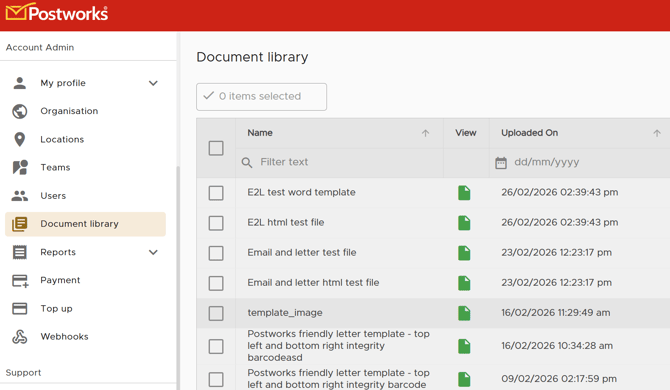
Finding your templates
The library displays all your saved templates in a clear list. You can see the file name, the date it was uploaded, and who added it.
To help you find what you need quickly, use the Filter text boxes at the top of each column. You can filter by:
- Name: Find a specific template by title.
- Category: Group your templates by type, such as "Merge template" or "HTML template".
- Postbox Name: See which templates are assigned to specific postboxes.
Adding a new template
When you have a new letter or email design ready to go, adding it to your library takes just a few clicks.
- Click the Add new button in the top right corner.
- Choose the file from your computer. This should be a DOCX file for letters or an HTML file for emails.
- Assign a name and category so your team can find it easily later.
- Save your changes.
Viewing and checking files
If you want to double-check a template before sending a batch of mail, look for the green icon in the View column. Clicking this will let you see the file content to ensure your formatting is exactly how you want it.
Deleting old templates
To keep your workspace tidy, you might want to remove templates that are out of date.
- Tick the checkbox next to the template (or templates) you want to remove.
- Click the yellow Delete button at the top of the page.
- Confirm the deletion.
Warning: Be sure you no longer need a template before deleting it. Once removed, a template cannot be recovered and would need to be uploaded again.