![Logo (transparent background, red emblem, red text, tagline NOT included) (PRIVATE).png]](https://support.postworks.co.uk/hs-fs/hubfs/Logo%20(transparent%20background%2c%20red%20emblem%2c%20red%20text%2c%20tagline%20NOT%20included)%20(PRIVATE).png?height=40&name=Logo%20(transparent%20background%2c%20red%20emblem%2c%20red%20text%2c%20tagline%20NOT%20included)%20(PRIVATE).png)
Before you start
- You need to be an Account Admin to manage domains.
Add a new domain
Enter only the domain name (for example, postworks.co.uk). Do not include https:// or www.
- Open Organisation, then select Domains.
- Select Add new.
- Enter your domain name in the Domain field.
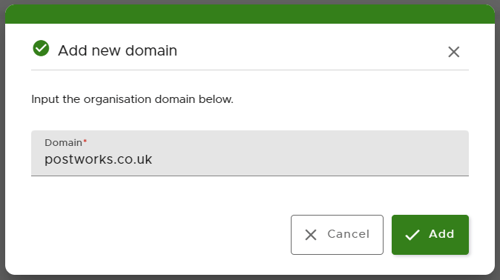
- Select Add.
What happens next
Postworks generates your DNS records automatically. A window appears displaying your CNAME record names and values.
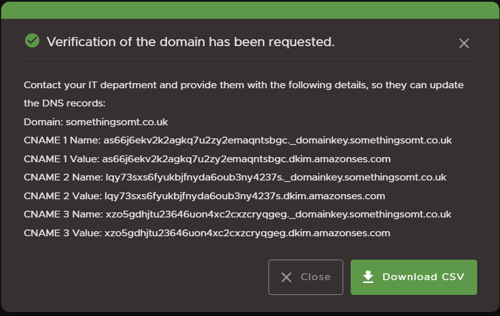
To complete domain setup:
- Select Download CSV to save a copy of the records, or view them anytime on the Domains page.
- Share these DNS records with your IT department so they can update your domain settings.

Monitor domain verification
Postworks checks your DNS settings automatically for up to 72 hours after you add a domain.
You can check the status on the Domains page:
- Verification Pending: Postworks is checking for the updated DNS records.
- Verified: Postworks detected the updated records. Your domain is ready to use and will appear in the domain dropdown menu when you create Postboxes.
- Unverified: Postworks could not detect the updated DNS records within 72 hours.
Adding subdomains
Subdomains are covered under the verification of your main domain. However, to make a subdomain appear in the domain dropdown menu when creating Postboxes, contact our support team so we can add it to your account manually.
Troubleshooting
If your domain status changes to Unverified:
- Check with your IT department to confirm that the CNAME records match the details provided in Postworks and were added correctly to your DNS provider.
- Select Retry on the Domains page. This instructs Postworks to scan your DNS records again to see if they have updated. You can retry the verification scan as often as needed for up to 15 days after adding the domain.
Unverified domain timeline
Postworks gives you 15 calendar days to complete verification:
- Day 7: Account Admins receive a reminder email if the domain is still unverified.
- Days 13 to 15: A notification banner appears at the top of the Portal for Account Admins.
- Day 16: Postworks automatically removes the unverified domain from your account.
If your domain is automatically removed, you can add it again on the Domains page to restart verification.
Need more help?
If you need help setting up a subdomain or verifying your domain, contact our support team and include the domain name you are trying to add.